
Attendance, Reports and Leave: How TeamUp Keeps Every Workday on Record
For most HR teams in Bangladesh, attendance is still a monthly scramble: export the fingerprint machine, clean the sheet, chase missing punches, check leave forms, then hand the numbers to payroll. TeamUp puts all of that in one place, so the attendance you see during the month is the attendance that reaches the salary sheet.
One daily activity report for every employee
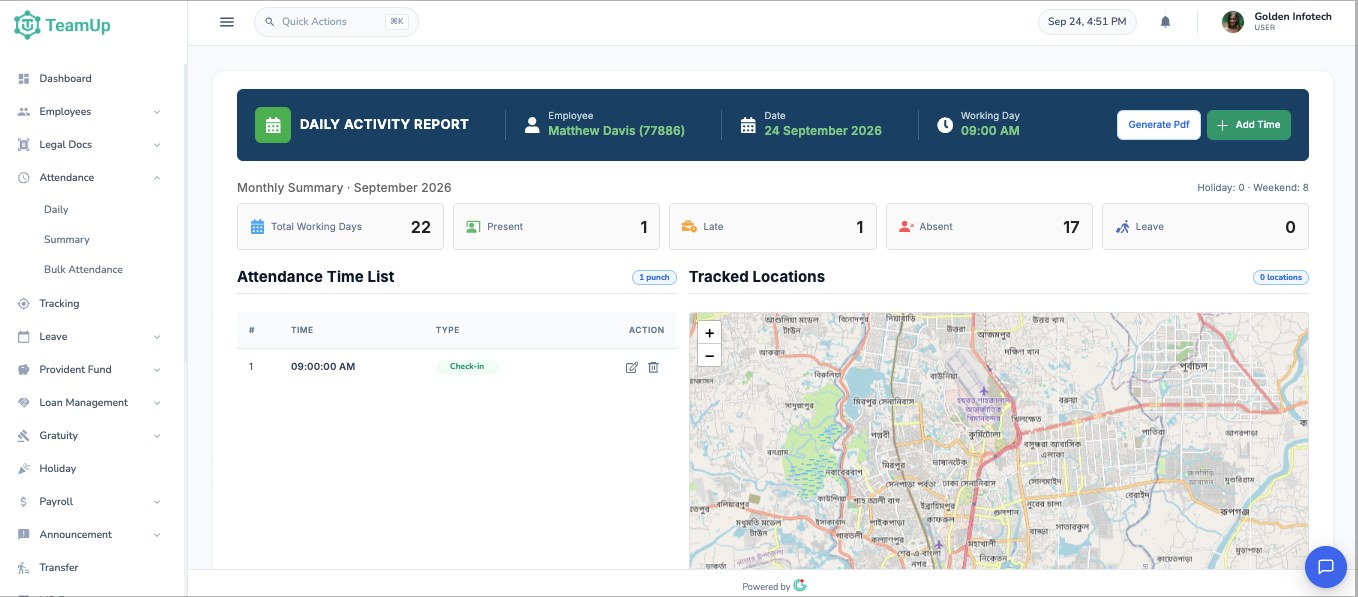
Open any employee from the attendance screen and TeamUp shows a daily activity report for the date you choose. The header shows the employee, the date and the shift start time for that day. Below it, the attendance time list shows every punch in order, marked as check-in or check-out.
•
Correct a wrong punch with the edit button, or add a missing one with Add Time.
•
Download the day as a PDF with Generate PDF when you need a record for a file or a dispute.
•
See the tracked locations for that day on a map when the employee used the mobile app.
The whole month at a glance
Above the time list, a monthly summary counts total working days, present days, late days, absences and leave for the month, with holidays and weekends shown separately. HR can see at once who is falling behind, without opening a spreadsheet.
Attendance from every source
Punches can reach TeamUp in three ways, and they all land in the same report:
•
Fingerprint machines: export the punch file from your device and upload it. TeamUp matches each device ID to the right employee.
•
Web check-in: employees check in and out from the browser, with their location recorded.
•
Mobile app: Android users check in with GPS and confirm their position on a map before the punch is saved.
Shifts that match how you really work
Each office shift has its own start and end time for every day of the week, with grace margins for early and late arrival. Rosters let you give any employee a different shift on a specific date. Night shifts that cross midnight are handled properly, so a punch at 2 am counts toward the shift that started the evening before.
Leave management without paper forms
•
Employees apply for leave from the web or the Android app, choosing the leave type, dates and reason.
•
The line manager and HR get an in-app notification and an email, and approve or reject from their own screen.
•
The employee is told the decision, and their balance for each leave type updates straight away.
•
A sandwich-leave rule stops requests that wrap around a public holiday.
•
Unused leave can be carried forward to the next year, and paid leave can be cashed out at final settlement.
Reports you can hand to management
Daily, monthly and summary attendance reports, plus leave reports, can be filtered and exported to Excel or PDF. Line managers see the same views for their own team only.
Straight into payroll
Because attendance and leave live in the same system as salary, your late and absence deduction rules are applied when the salary sheet is generated. HR previews the full sheet before saving it, so there are no surprises on payday.
Want to see your own attendance rules in TeamUp? Book a free demo and we'll walk you through it.